You run a server, the terminal crashes, and suddenly localhost:3000 is still occupied. You have no idea which process owns it. Sound familiar?
Port solves this. Two ways to use it:
$ port                    # TUI mode — interactive table
$ port 3000              # CLI mode — kill port 3000 directly
$ port --list            # List ports as text (scriptable)
The Problem
It happens all the time. You start a Node.js server, a Python Flask app, or a Rust backend. Then:
- Your terminal freezes
- You accidentally close the wrong window
- Your IDE crashes
The server? Still running. Invisible. Occupying the port.
Finding and killing it the old way:
| |
Simple, but annoying. Repetitive. Is not cool enough XD.
Why This Exists
You could just add an alias to your shell:
| |
And be done with it. This project exists because:
- Learning Rust — a real, usable tool from scratch
- Understanding /proc — how Linux actually tracks sockets and processes
- TUI exploration — building interactive interfaces with Ratatui
- Fun side project — sometimes you build something just to build it
Think of it as a practical study project, not a replacement for lsof or ss. If you want something production-ready, use the real tools. If you want to understand how those tools work under the hood, this is one way in.
Features
- TUI mode — Interactive table with Vim-style navigation
- CLI mode —
port <port>to kill directly, no interaction needed - List mode —
port --listfor scriptable output - Docker support — Detects container ports, kills via
docker stop - Smart filtering — Excludes SSH, HTTP, Docker, systemd, and other system services automatically
- Search — Live filter by process name or port number
- Quick kill — Select, hit Enter, confirm with
y— process terminated (SIGKILL) - Show all ports —
--allflag bypasses the filter when you need to see system services too
Installation
The easiest way to install is with the one-liner:
| |
This automatically detects your architecture (x86_64 or aarch64) and installs to ~/.local/bin/port.
Or build from source:
| |
Single binary, no dependencies.
Usage
TUI Mode
| |
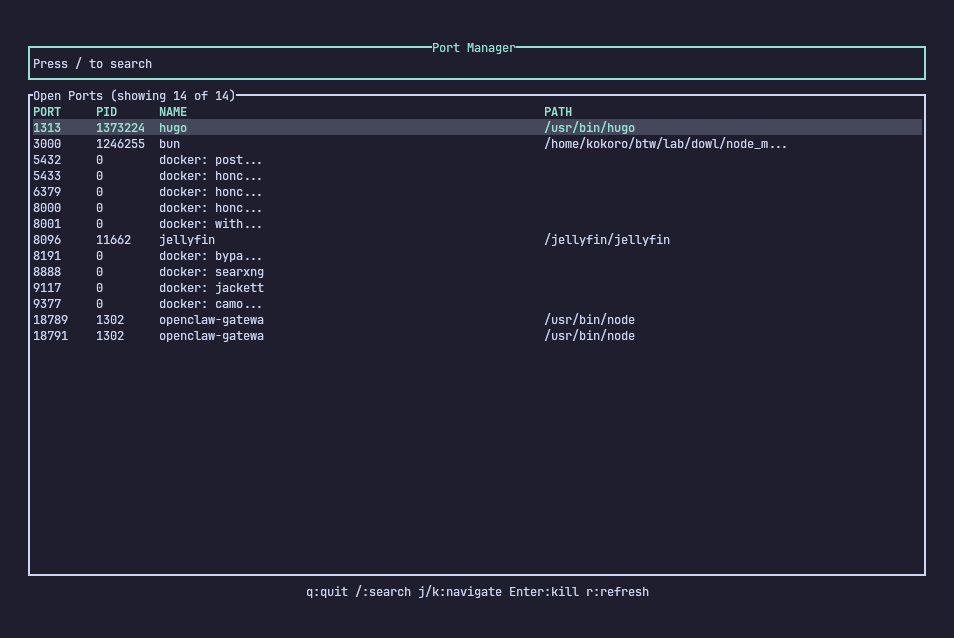
Navigate with j/k, search with /, kill with Enter + y.
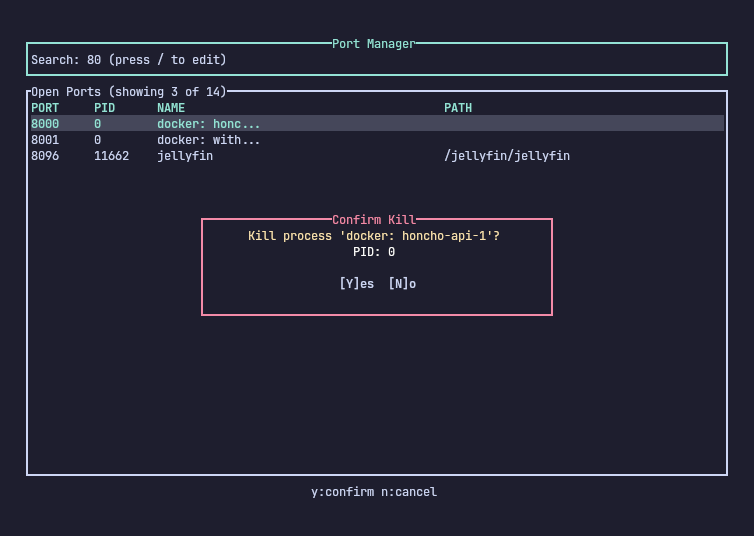
CLI Mode (direct kill)
| |
Kills the process on port 3000 directly. Works for both regular processes and Docker containers.
List Mode
| |
3000 100 node
5173 101 node
8080 102 python3
Useful for scripting or piping to other tools.
How It Works
Port reads from multiple sources to get a complete picture:
/proc/net/tcpand/proc/net/tcp6— parsing listening sockets directlyss -tlnpe— supplementary discovery for edge casesdocker ps— detects exposed container ports
For each port, it builds an inode-to-PID map by scanning /proc/[pid]/fd/* symlinks, then matches socket inodes to processes. Docker containers are identified by their container ID and stopped via docker stop -t 0 (SIGTERM, immediate).
The Stack
| Layer | Technology | Why |
|---|---|---|
| Port Discovery | /proc parsing + ss + docker ps | Zero external deps for core, docker CLI for containers |
| TUI | Ratatui | Fast, composable terminal UI |
| CLI Args | Clap | Structured argument parsing |
| Process Control | libc::kill + docker CLI | Direct syscall for processes, docker CLI for containers |
| Language | Rust | Safety + performance |
Architecture
src/
├── main.rs      # Entry point, CLI arg parsing, terminal setup
├── app.rs       # State machine (Normal/Search/ConfirmKill modes)
├── events.rs    # Key event handling
├── ui.rs        # Ratatui rendering
├── ports.rs     # Port discovery from /proc, ss, docker ps
├── process.rs   # Process kill (SIGKILL) + docker stop
├── filter.rs    # System port/process filtering
└── lib.rs       # Module exports
Why Docker Stop Instead of SIGKILL?
For Docker containers, we use docker stop -t 0 instead of SIGKILL. This sends SIGTERM to the main process inside the container, which:
- Respects the container’s shutdown logic
- Allows graceful cleanup
- Avoids leaving orphaned processes
Regular processes still get SIGKILL — they’re typically orphaned servers that won’t respond to SIGTERM anyway.
Development & Testing
| |
Future Ideas
- Configurable filters (TOML config instead of hardcoded lists)
- UDP support (
/proc/net/udp) - Sort by memory/CPU usage
- Port forwarding / rebinding
- JSON output mode
Try It Out
Port is MIT-licensed and available on GitHub.
| |
Or clone and build:
| |
Issues and feature requests welcome.
See you in the Wired.